

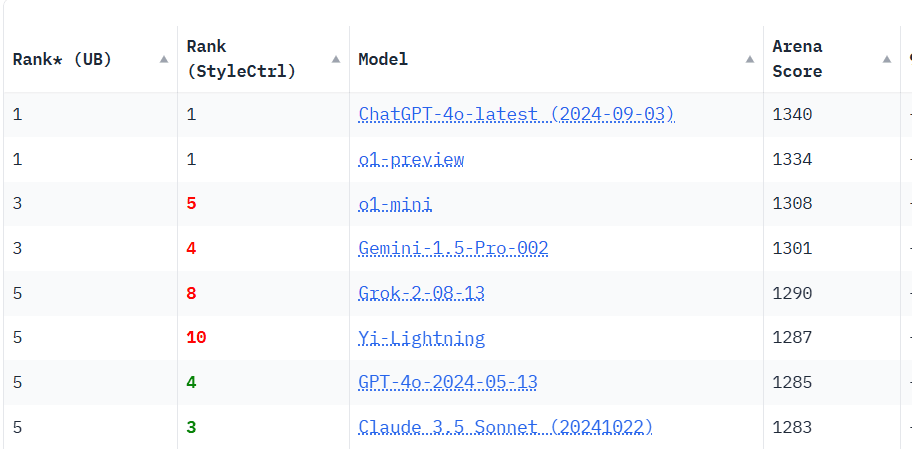
What is Yi Lightning and how to access it?
Yi Lightning is a new, Chinese-created model that is difficult to access. NanoGPT has it available.
Updates, guides, and insights
Showing
168 posts found for 'models'
Yi Lightning is a new, Chinese-created model that is difficult to access. NanoGPT has it available.

Overview of all the updates to NanoGPT in October 2024

Explaining why we prefer to take payments in Nano rather than through credit cards, including the benefits of zero fees and instant settlements.
Celeris 1 uses diffusion-based text generation for short tasks. See its provider-reported speed results, benchmark caveats, NanoGPT limits, pricing, and a small API test.
A practical way to compare AI voices for narration, assistants, characters, ads, and multilingual speech using previews and a repeatable audition script.
See how Poolside Laguna S 2.1 performs on coding and agent benchmarks, what Thinking mode adds, what it costs, and which version to use.
Learn why OpenRouter returns 429 errors, how to tell platform limits from provider capacity, and how retries, fallbacks, and a second gateway improve recovery.
A practical guide to custom tools, public MCP servers on supported OpenAI models, streaming tool calls, and stored response chains in NanoGPT's Responses API.
Compare Doubao Seed Character, Aion 3.0, and Aion 3.0 Mini for character chat, roleplay, long-form storytelling, image input, and price.
See how Sakana AI's Fugu Ultra uses multiple AI agents, what its coding and reasoning benchmarks show, what it costs, and when the premium makes sense.